How To Plan a Reliable Office Network in Nashville, Tennessee

Is Biodegradable Dish Soap Safe for Septic Systems?

What to Wear and Bring to a Desert Fall Festival

Key Takeaways
- Start with business workflows, device counts, floor plans, and realistic growth expectations.
- Use wired Ethernet for critical equipment and wireless connectivity for mobility.
- Plan cable pathways, racks, power, cooling, and spare capacity before installation.
- Separate employee, guest, voice, security, and connected-device traffic when appropriate.
- Test, label, and document the completed network before project handoff.
A dependable office network is not created by choosing the fastest Internet plan or buying the newest wireless hardware at the last minute. For Nashville-area businesses, a better result starts with a plan that connects the building layout, employee workflows, cabling, wireless coverage, power, security, and future growth. Organizations planning a move, renovation, or new buildout can review telecommunications Nashville services from LanLink Communications, a Murfreesboro-based provider focused on commercial network cabling, fiber optics, wireless infrastructure, rack systems, and low-voltage installations for clients throughout Greater Nashville and Middle Tennessee.
Whether the office supports a growing professional-services team, a healthcare practice, a school department, or an industrial operation, the same principle applies. The physical and technical networks must be planned together before walls are closed, furniture is installed, and employees depend on the system every day.
The Real Cost of a Poor Office Network
Slow cloud applications, interrupted video calls, weak Wi-Fi, unreliable VoIP phones, and disconnected devices can disrupt work throughout the day. Faster Internet service may help when the connection itself is the bottleneck, but it will not correct overloaded switches, poor cable runs, weak access-point placement, or an overcrowded equipment closet. Reliability begins with a sound foundation.
Start With a Business and Device Assessment
List every device and service the network must support now and over the next three to five years. Include desktop computers, laptops, VoIP phones, printers, conference-room displays, access points, security cameras, door-access hardware, cloud applications, guest devices, and any specialized equipment. Account for planned hires, added workstations, new meeting rooms, and future production or storage areas. Designing only for today’s headcount can make expansion unnecessarily disruptive.
Map the Office Before Choosing Equipment
Use a current floor plan to mark workstations, conference rooms, copier areas, network closets, ceiling conditions, thick walls, elevators, and future expansion space. Then identify data outlets, camera positions, access-point locations, rack locations, and possible intermediate distribution points. This step is especially valuable in renovated Nashville buildings, where existing walls, ceilings, and pathways may affect cable routing and wireless coverage.
Choose the Right Mix of Wired and Wireless Connections
Use Wired Ethernet for Critical Devices
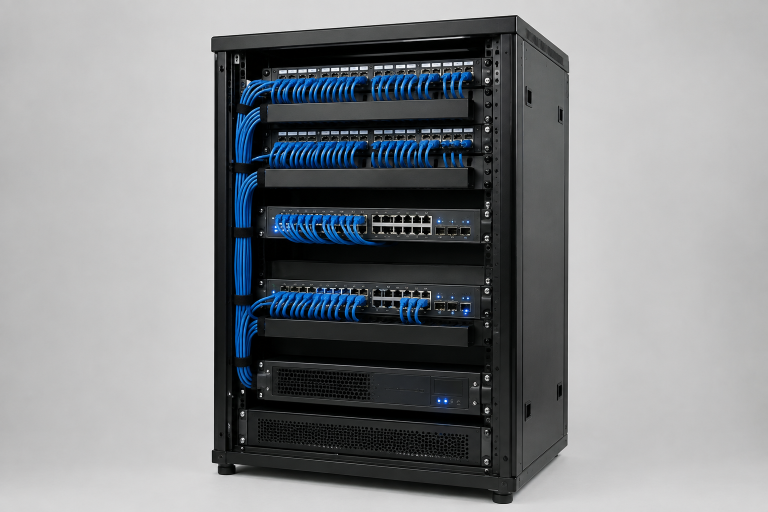
Wired connections are often the better fit for equipment that needs predictable performance and continuous availability. Common examples include desktop workstations, VoIP phones, servers, storage systems, printers, security cameras, wireless access points, conference-room systems, and point-of-sale equipment. A wired connection also provides many devices with a path to receive power via Power over Ethernet when the design supports it.
Use Wireless for Mobility
Laptops, tablets, mobile scanners, and guest devices benefit from wireless access. The strongest office designs do not treat Wi-Fi as a replacement for every cable. They use wireless where mobility matters and wired connections where stability, capacity, and consistent latency matter most.
Select Cabling for the Building and Workload
Copper and fiber each have a place in a commercial network. The right selection depends on the required distance, expected speed, Power over Ethernet needs, building conditions, and upgrade plans. Structured cabling, installed through organized pathways and terminated at labeled patch panels, is easier to troubleshoot than scattered point-to-point runs. It also makes future adds, moves, and changes more manageable.
Plan the Network Closet, Rack, Power, and Cooling
The network room needs usable rack space, patch panels, cable management, switch capacity, power distribution, battery backup, ventilation, and physical access control. Leave room for additional switches, patch-panel ports, and power needs rather than filling every available space on day one. Crowded racks, restricted airflow, unlabeled cables, and limited electrical capacity can turn a small maintenance task into a lengthy outage.
Design Wireless Coverage Around People
Square footage alone does not determine Wi-Fi needs. Consider how many people use each space, the number and type of devices, video-call activity, roaming needs, wall materials, and high-demand rooms. A busy conference room may need more wireless capacity than a larger storage area. For multi-floor offices, dense occupancy, or business-critical Wi-Fi, access-point placement and signal-propagation planning can help guide a proper site survey or heat-map process.
Separate Traffic and Build Security Into the Design
Having all devices on one flat network complicates management and troubleshooting. Separate segments for systems like employee devices, guest Wi-Fi, voice, cameras, building controls, connected devices, and servers are advisable. The design should align with organizational needs and security. Security must be planned before installation, including secure equipment rooms, authentication, wireless security, firewalls, updates, monitoring, and backup links. Enterprise Wi-Fi security emphasizes protecting authentication, encryption, infrastructure, and network pathways beyond access points.
Prepare for Downtime Before It Happens
- Identify the systems that must remain online.
- Place essential network equipment on battery backup.
- Consider a secondary Internet connection for critical operations.
- Keep labeled spare cables, power supplies, and replacement equipment available.
- Document outage contacts and test recovery procedures.
A medical office, for example, may need phones, scheduling, payment processing, and secure connectivity to remain available during an Internet or power disruption.
Test, Label, and Document Every Connection
Before handoff, test each cable run, confirm wireless coverage, verify Power over Ethernet devices, label both ends of every cable, update rack and port diagrams, and save equipment details and test results. Clear as-built documentation saves time during repairs, audits, office moves, and later expansion.
Questions To Ask Before Approving a Proposal
- How will the design support future growth?
- Which cable types are suitable for the building and planned equipment?
- How will wireless access-point locations be selected?
- Will cabling be tested, labeled, and documented?
- What spare rack, port, pathway, and power capacity will remain?
- How will the installation coordinate with construction, electrical, security, and IT teams?
Build the Plan Before the Problems
A reliable Nashville office network comes from coordinated planning, not last-minute equipment purchases. Build a stable foundation, leave room for growth, and make decisions about cabling, wireless, security, power, testing, and documentation based on how people actually work.